08 August, 2009

AVM FRITZ!Box Fon WLAN 7270 review

are two analogue ports for phones or fax machines, an integrated DECT base station supporting up to six cordless phones, and VoIP support. It even has integrated fax and answering machines.

To get you onto the internet, the FRITZ!Box has a built-in ADSL2+ modem, and can work with cable or fibre connections. It supports the 802.11n wireless standard, and you can even plug in a 3G dongle into its integrated USB port and access the net without a landline. Or, connect a USB printer or hard drive to create a network device.

In our wireless tests, read/write speeds got as high as a 4.2MB/sec average, and were over 3.5MB/sec. But it's the router's advanced traffic shaping feature that really impressed. By checking pending processes every millisecond, it ensures your surfing or email is never held up by heavy uploads or downloads.

Unfortunately, this device lacks the feature Mac users are crying out for. It can't operate on the 2.4GHz and 5GHz wavebands simultaneously. This means if you want to join the network using a wireless g device, you're restricted to a congested 2.4GHz band.

Unless you're interested in its telephony functions this might not be the router you're looking for, but there's no doubt that it's an extremely high-quality piece of kit.

Linksys WRT320N Dual-Band Wireless-N Gigabit Router review

The latest fad to get the marketing push from wireless network manufacturers is dual-band. While we wait for the 802.11n specification to make it over a few more legal hurdles and get ratified, the manufacturers are pushing a feature that has been a specification since day one, and now we have the Linksys WRT320N.

The manufacturers seem to forget that 802.11n has always been specified to operate at 2.4GHz and 5GHz, although for cost reasons the first glut of consumer devices focused on 2.4GHz, while businesses enjoyed 5GHz.

The WRT320N operates at both frequencies, and can improve performance because of this. There is a crucial caveat with the dual-band on offer, though. The WRT320N doesn't operate on both bands simultaneously, so you have to define which you want your network to use.

If you're looking to build a network using both frequencies, Cisco's WRT400N is the router for you. The WRT320N does support fast-wired connections, though, offering up four gigabit Ethernet ports – great if your network is wired.

Thanks to Cisco's wizard, configuring the router is straightforward. Also, we were able to use our iBook in the garden, and the powerline extender in the spare room wasn't needed. We saw throughput go from 2.8MB/sec to 3.8MB/ sec at reasonable range, although this isn't outside of what's expected from routers.

It does the job and doesn't cost over the odds either. Shame Cisco doesn't produce a Mac compatible dual-band adaptor, though.

Hands-on: Sony DSC-WX1 review

Sony is extremely excited that its new Exmor R sensor has made its way into the compact market.The technology means that photographers can eke more light out of even the most ink-black of shooting conditions.

Both the new DSC-WX1 and DSC-TX1 have been blessed with the CMOS technology that was last seen in the company's HX1 cameras. To fit the tech into the body of a compact cam is no mean feat.

While the WX1 is a chunky camera, especially when compared to its stablemate the super-slim TX1, it's because the unit is sporting a zoom-friendly Sony G lens rather than the Exmor R tech.

The camera is a sturdy and solid as you would expect from a Cyber-shot, and has a number of features which will help most with their shot-taking in low-light situations.

These include a hand-held twilight mode which fires off six images in less than a second and layers them on top of each other to create a much sharper and more detailed shot.


The results are impressive. A demo we saw put both the TX1 and WX1 way ahead in low-light shooting quality than most other compact cameras we have seen on the market.

While most the functions of the WX1 can be found on the more stylish TX1, the chunkier compact does beat it on optical zoom size (5x).

And when you use the camera's pièce de résistance, the Panorama Zoom, you have a few more degrees to play around with – a 256-degree panorama, compared to the TX1's 185 degrees.


With Sony believing that its new compact sensors are almost twice the sensitivity of conventional sensors, there's no denying that the camera is a brilliant piece of technology.

With image clarity – especially in low-light – that not even the most hardened pro can turn their nose up at, the WX1 is definitely something a bit special.

The camera will be out in September for £330. And don't forget, you can also connect it up to the Party-shot!

More pictures below:


ITV to rebrand its HD channel for Freeview HD

ITV will rebrand its high definition channel as ITV1 HD when it launches on Freeview HD at the end of this year.

Currently ITV HD only runs at certain times on the Freesat platform, via red button interactive services.

However, the arrival of Freeview HD at the end of the year in Granada, and the subsequent roll-out over Britain, will see the channel rebranded.

Familiarity

ITV said: "The simulcast service will exploit the power of the ITV1 brand, the familiarity of the audience with the architecture of the schedule as well as the fact that ITV invests 90 per cent of the ITV1 programme budget in the peak time schedule."

This appears to clear the way for any future HD channel additions from the independent broadcaster – who runs four channels and a timeshifted fifth in digital standard definition.

The broadcaster is beginning to ramp up its HD drama, and the 2010 World Cup next summer will be available in high definition.

Via WotSat

LG's GD910 watchphone costs less than expected

LG's GD910 watchphone has debuted in France for the princely sum of €899 (£770).

While this is still outrageously expensive for a mobile phone (especially when that's only the on-contract price) it's a darn sight cheaper than previously thought.

Early estimates placed the phone at around £1,000 on contract due to 'leaks' from LG and Orange (which is also exclusively picking up the device in the UK) but it's happily appeared for over £200 less.

Future pricing

Of course, that price could still go up or down when it's released over here (and we still don't know exactly when that will be) but given Samsung has said it probably won't be releasing its watchphone effort in the UK there's not likely to be a price war.

Admittedly it is some very cool technology, with a 14mm thin device holding a splashproof 1.43-inch screen. We don't want to go down the stereotypical Dick Tracy comparison route, but we'd imagine everyone using the LG GD910 would be using video calling a lot more than before.

It apparently also uses LG's most advanced voice recognition and synthesis technologies according to the French release - so we'll look forward to that when it appears.

Via Orange.fr

07 August, 2009

Philips GoGear Opus MP3 player


Does this deliver a superior sound experience?
If Philips are guilty of one thing, it's overlooking a decent product name. That trend seems to be changing, which is a good thing considering the GoGear Opus could also be known as the SA1OP08K. So what we have here is the latest 8GB version of their GoGear MP3 player with video.

The Opus bears more than a passing resemblance to the previous generation of pocketable music and video players from the company. The front is dominated by the screen with controls sitting across to the right. The controls are kept basic, with a power/play button sitting in the centre of a four-way navigator, accompanied by "Options" and "Back".

The Opus itself is slim, measuring 107 x 57 x 11, which means that it's about the size of a mobile phone, if not a little larger. The black and silver design is attractive and it feels well constructed: the plastics feel ok and it is free from creaks as you grip it. At 95g it feels weighty enough in the hand to feel like a quality product.

We like the brushed back of the Opus as it keeps it free from fingerprints. Around the sides you'll also find a volume control and a "Hold" slider which is strangely located on the bottom alongside the Mini-USB and 3.5mm sockets.

But the real interest is in the 2.8-inch 320 x 240-pixel LCD display on the front. It isn't the highest resolution, or the latest OLED technology, and we'd like something a little sharper. Colours are vibrant, but it struggles against some of the sharp mobile phone screens we have seen recently.

Power on and the Opus always seems to need to "update", something we found previously with Philips' players. The menus are clear but basic and break down the main functions (music, video, pictures, radio, recordings) and then giving you access to a folder view and settings.

One thing we like about the menus is that they'll pickup a background image from the cover art or video thumbnail, so it is fleshed out a little better than a straight texted-based menu, but doesn't have the wow-factor that you'll find elsewhere.

Navigation and control through the menus is easy, although one minor niggle is the length of time it takes to get from power on to listening to music. Not only do you have to wait for that update/startup cycle, but you then need to click through the levels of menu before music starts, because the play button doubles as the ok button – you can't power on and press play like you can on an iPod.

The bundled headphones themselves are actually very good and capable, which is a positive point over some of the leading MP3 players out there. You get a choice of three different sized rubbers. Find the right fit and you'll find the performance is impressive: good rich bass that is characteristic of Philips headphones, which is great for pop and dance music, but can be a little heavy for voice or classical music.

Philips are pushing their FullSound technology in the Opus, as they have in other players in the past. We've seen a number of devices featuring FullSound and generally it is a good system, enlivening music somewhat. We found FullSound to be preferable over the other EQ presets and the best setting for general listening.


Format support on the audio front is reasonable with MP3, WMA, AA and FLAC, but a little restrictive on the video front, only supporting AVI and WMV, but you will be able to download BBC iPlayer content and sideload it. The bundled software will convert other common formats for you, but in this world where simplicity rules, we'd rather see more support in the player itself to save uses the time spend in the conversion process.

If you are a Mac user you'll not benefit from this software (although you could easy download a free video convertor) and then simply use the drag and drop approach to load-up content.

The GoGear Opus also comes with a 30-day free introduction to Napster To Go and is AudibleReady. An FM radio and voice recorder are also present.

Battery life is pretty good at 30 hours of music and 6 hours of video, although you don't get a charger in the box, although the Mini-USB connection will work with many last-generation phone chargers. A short USB cable is supplied, as is a cover to stop your player getting all scratched up.

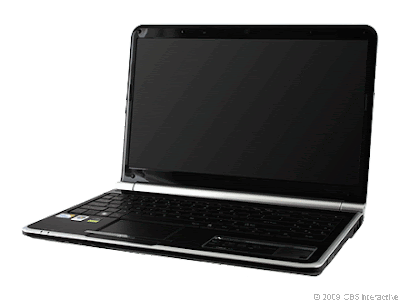
Gateway NV5807u


Product summary

The good: Low-priced Core 2 Duo laptop; good selection of ports; includes Bluetooth and 802.11n Wi-Fi.

The bad: Mediocre battery; weak speakers.

The bottom line: It may not inspire, but for less than $600, the Gateway NV5807u is a great value as an all-around 15-inch laptop.

Specifications: Processor: Intel Core 2 Duo (2.1 GHz) ; RAM installed: 4 GB DDR II SDRAM ; Weight: 5.8 lbs ; See full specs at the end of the article

These days, perfectly usable laptops can be had for a song, particularly if the laptop being shopped for is a modest midrange model. In what's becoming a trend, Gateway's NV5897u debuts as yet another midsize, decently spec'd Core 2 Duo laptop in a frame that's not too bulky, but certainly won't be confused for a Netbook anytime soon.

Since Gateway and Acer have merged, Gateway survives largely as a familiar brand providing a variation on Acer's offerings. In the case of the NV5807u, the result is worth noting because the cost is as good as we've seen for what it offers. At $599, it's priced to be an impulse upgrade for someone who's already considering a Netbook, which are ranged anywhere from $300-$500 these days. If a larger screen, true multitasking, and good all-around performance are what you're after, then it's hard to beat the Gateway NV5807u in terms of bang for your buck.

Price as reviewed / Starting price $599
Processor 2.1GHz Intel Core 2 Duo T6500
Memory 4GB, 667MHz DDR2
Hard drive 320GB 5,400rpm
Chipset Mobile Intel GM45 + ICH9
Graphics Intel GMA 4500MHD
Operating System Windows Vista Home Premium SP1
Dimensions (WD) 14.6x9.8 inches
Height 1.0-1.5 inches
Screen size (diagonal) 15.6 inches
System weight / Weight with AC adapter 5.76/6.58 pounds
Category Mainstream

Priced at the top of Gateway's style-conscious NV range, the NV5807u configuration shares the same design as its NV siblings. The lid, glossy and dark blue, has a subtle honeycomb pattern and a small silver Gateway logo-panel. A large, round silver hinge opens wide to reveal the black interior, and operates smoothly. The interior of lid is glossy, with curved edges. The thick round hinge also houses the Kensington lock and power button on either side, as we've seen on certain Sony Vaio models.

Large matte wrist rests give ample space below the nearly edge-to-edge flat keyboard. Although the keys are closely spaced together, with the space bar made slightly shorter than normal, to fit in the adjoining number pad (not normally a feature on 15-inch laptops), the matte key surfaces feel comfortable and typing was smooth and responsive.

Above the keyboard, a small row of LED-backlit touch controls trigger MyBackup software, an energy-reducing Power Save mode, as well as on/off controls for Wi-Fi, touch pad, mute, and volume. The touch pad doesn't have multitouch support, but the wide-aspect surface has a comfortable feel and size, perhaps running a little smaller than we'd ideally prefer. The touch pad buttons, though, are awkward: a single mirrored bar below the pad can be clicked on either side, but the bar is too thin, long and strangely placed (the edges lay lower the palm rests instead of rising above) to be found easily when typing, making it more attractive than functional.

In terms of overall chassis size and weight, it's close to the Sony Vaio NW series. We prefer the NW's design, but the NV has an appealing, more muted look, and is particularly impressive considering its bargain price.

The 15.6-inch 16:9 glossy LED-backlit screen feels very large and nearly goes edge-to-edge on the inner lid. Inset from the black glossy plastic that surrounds it, the glare isn't as bad as other fully edge-to-edge glass screens. The NV5807's screen has a native resolution of 1,366x768 pixels, which is standard for a screen this size. In anecdotal streaming video viewing, the picture was very good but not the brightest or crispest we've seen. While the Gateway NV5807u boasts Dolby sound, the volume from the built-in speakers was audible but not booming, placing it in the middle of the pack as far as built-in audio goes.

A Webcam and microphone lie above the screen for online chat and video conferencing.

Gateway NV5807u Average for category [mainstream]
Video VGA-out, HDMI VGA and HDMI or DisplayPort
Audio Stereo speakers, headphone/microphone jacks Stereo speakers, headphone/microphone jacks
Data 4 USB 2.0, SD card reader 4 USB 2.0, SD card reader
Expansion None ExpressCard/54
Networking Ethernet, 802.11 b/g/n Wi-Fi, Bluetooth Ethernet, 802.11 b/g/n Wi-Fi, Bluetooth, optional WWAN
Optical drive DVD burner DVD burner

The selection of ports is great for a laptop this size and price, although it lacks an ExpressCard slot. An HDMI port, a generous four USB 2.0 ports, SD card reader, VGA-out, along with Ethernet and a modem jack round out the set. Internally, the NV5807u has both Bluetooth and 802.11 b/g/n Wi-Fi. It's good to see that Gateway didn't skimp on either.

While NV configurations are available at Gateway with AMD Athlon, Turion, or Intel Core 2 Duo processors, the NV5807u is listed as a retail configuration with fixed specs that includes a Core 2 Duo processor, a 320GB hard drive, and 4GB of RAM. It's available at retailers including Amazon.com.

The 2.1GHz Intel Core 2 Duo T6500 processor is one we've seen in several other manufacturer's laptops in this price range, including the Toshiba Satellite A505-S6960, the Dell Studio 1440-022B, and the HP Pavilion dv4-1465dx, as well as the recently-reviewed Sony Vaio NW160J.The NV5807u, however, is the most affordable laptop in this range. The T6500 is perfectly good for any basic multitasking or multimedia work, video or music viewing, or office work, as well as Web browsing. The included graphics capability doesn't give this any gaming muscle, but basic casual games play fine (we also enjoyed some Quake Live on it).

Juice box
Gateway NV5807u Average watts per hour
Off (60 percent) 0.49
Sleep (10 percent) 0.93
Idle (25 percent) 7.3
Load (5 percent) 41.23
Raw kWh 37.44
Annual energy cost $4.25

Annual power consumption cost

On the other hand, the NV5807u ran for two hours and 28 minutes on our video-playback battery drain test using the included six-cell battery. That's a disappointing number for a laptop this size, but it's our only real gripe with the NV5807. Then again, our video drain test is grueling--usage under normal Web-browsing and e-mail/office work conditions should produce better results.

Multimedia multitasking test (in seconds)
(Shorter bars indicate better performance)

Adobe Photoshop CS3 image-processing test (in seconds)
(Shorter bars indicate better performance)

Apple iTunes encoding test (in seconds)
(Shorter bars indicate better performance)

Video playback battery drain test (in minutes)
(Longer bars indicate better performance)

Support
The system includes an industry-standard, one-year warranty, with parts-and-labor coverage and return-to-depot service. Gateway offers a 24-7, toll-free, technical-support phone line, and the Web site has the usual driver downloads and FAQs, plus options for e-mailing or online chatting with technicians.

System configurations:

Gateway NV5807u
Windows Vista Home Premium SP1 (64-bit); 2.1GHz Intel Core 2 Duo T6500; 4,096MB DDR2 SDRAM 800MHz; 128MB (Shared) Mobile Intel GMA 4500MHD; 320GB Hitachi 5,400rpm.

Sony Vaio NW125 J/T
Windows Vista Home Premium SP1 (64-bit); 2.1GHz Intel Core 2 Duo T6500; 4,096MB DDR2 SDRAM 800MHz; 128MB (Shared) Mobile Intel GMA 4500MHD; 320GB Hitachi 5,400rpm.

Dell Studio 1440-022B
Windows Vista Home Premium SP1 (64-bit); 2.1GHz Intel Core 2 Duo T6500; 4,096MB DDR2 SDRAM 1066MHz; 256MB Nvidia GeForce 9400M G; 320GB Toshiba 5,400rpm.

Toshiba Satellite A505-S6960
Windows Vista Home Premium SP1 (64-bit); 2.1GHz Intel Core 2 Duo T6500; 4,096MB DDR2 SDRAM 800MHz; 128MB (Shared) Mobile Intel GMA 4500MHD; 320GB Western Digital 5,400rpm.

Popular Posts


My Blog List

Site Info

Followers

Gadget Reviews Copyright © 2009 Blogger Template Designed by Bie Blogger Template